List Sale
Home / Documentation /
⚙️ Getting Started
🏪 Outlet
⚙️ Settings
🏧 Working With Counter
💰 Working Denomination
🛒 Make a Test Sale
👥 Employee Management
📅 Attendance
📋 Working with Tax
🏦 Account
📦 Working (General Item)
📦 Working (Variation Item)
📱 Working (IMEI Item)
🏷️ Working (Serial Item)
💊 Working (Medicine Item)
💳 Working (Installment Item)
🔧 Working (Service Item)
📊 Stock (General Item)
📊 Stock (Variation Item)
📊 Stock (IMEI Item)
📊 Stock (Serial Item)
📊 Stock (Medicine Item)
📊 Stock (Installment Item)
📥 Purchase (General Item)
📥 Purchase (Variation Item)
📥 Purchase (IMEI Item)
📥 Purchase (Serial Item)
📥 Purchase (Medicine Item)
📥 Purchase (Installment Item)
🏷️ Barcode & Label
🖨️ Working with Printer
🛒 Sale (General Item)
🛒 Sale (Variation Item)
🛒 Sale (IMEI Item)
🛒 Sale (Serial Item)
🛒 Sale (Medicine Item)
🛒 Sale (Installment Item)
🔧 Sale (Service Item)
🌐 Multivendor e-Commerce
📧 Working with Email
💬 Working with SMS
💳 Payment Gateway Setting
💬 Working with WhatsApp
👤 Working with Customer
🏢 Working with Supplier
📤 Purchase Return (General Item)
📤 Purchase Return (Variation Item)
📤 Purchase Return (IMEI Item)
📤 Purchase Return (Serial Item)
📤 Purchase Return (Medicine Item)
📤 Purchase Return (Installment Item)
🔄 Sale Return (General Item)
🔄 Sale Return (Variation Item)
🔄 Sale Return (IMEI Item)
🔄 Sale Return (Serial Item)
🔄 Sale Return (Medicine Item)
🔄 Sale Return (Installment Item)
📊 Dashboard
🎁 Promotion & Coupon
🏆 Loyalty
💳 Installment Sale
🔧 Warranty/Servicing
📈 Income
📉 Expense
💰 Salary/Payroll
📋 Quotation
🔄 Transfer (General Item)
🔄 Transfer (Variation Item)
🔄 Transfer (IMEI Item)
🔄 Transfer (Serial Item)
🔄 Transfer (Medicine Item)
🔄 Transfer (Installment Item)
❌ Damage (General Item)
❌ Damage (Variation Item)
❌ Damage (IMEI Item)
❌ Damage (Serial Item)
❌ Damage (Medicine Item)
❌ Damage (Installment Item)
🏢 Fixed Asset
📊 Report
🔄 Update Software
❌ Uninstall License
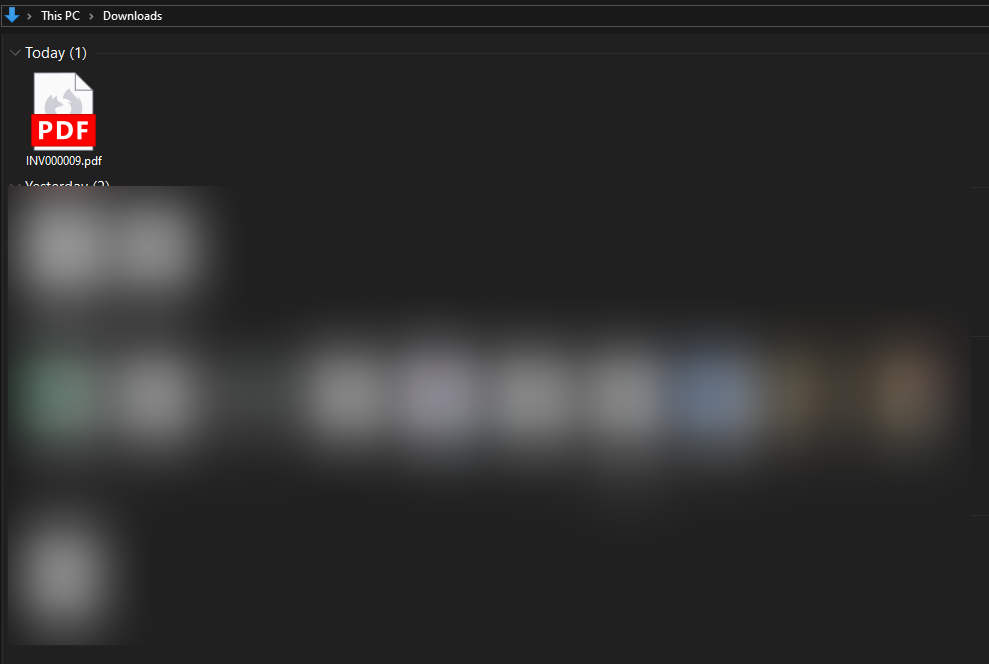
The List Sale module allows you to easily view and manage all your sales records in one place. It provides a clear overview of customer details, invoices, dates, and total amounts for better tracking.
-
In this module you can view all the sales records in a list format.
-
You can check details like invoice, customer, date, and total amount.
-
It helps in tracking and managing sales history easily.
Delivary Status Change
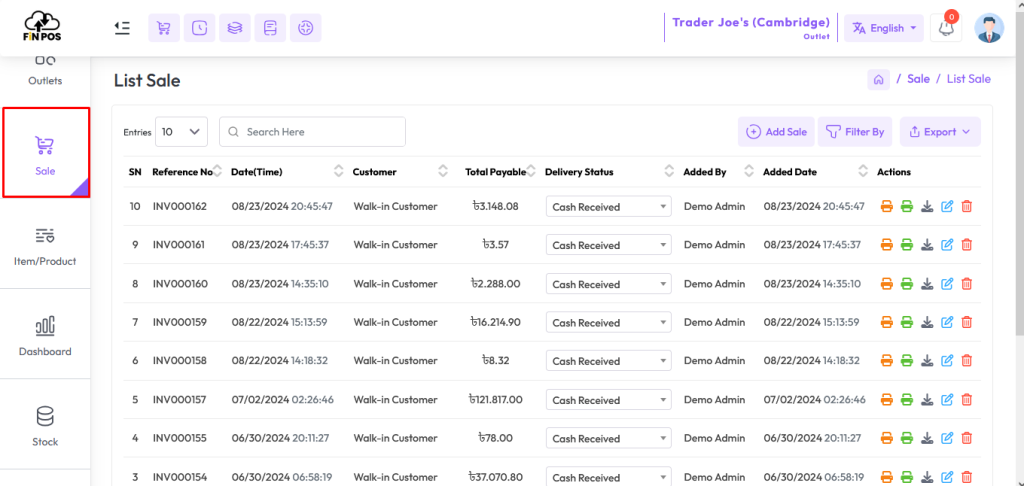
The Delivery Status Change module helps you update the delivery status of sales quickly. It ensures proper tracking of order progress and keeps records up to date.
In this module you can change the delivery status of a sale directly from the sale list.
It helps in monitoring the order delivery process.
Keeps customers and system updated with the latest status.
Print Sale Invoice
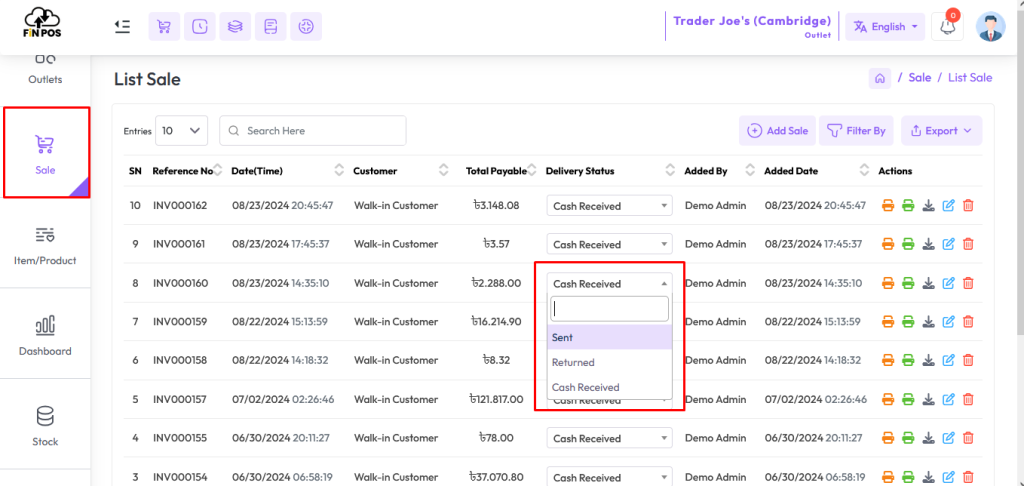
The Print Sale Invoice module allows you to generate and print invoices for your sales. It provides a professional document with all sale details that can be shared with customers or kept for records.
In this module you can print the invoice of any sale from the sale list.
Just click on the Print Invoice button to generate the invoice.
It helps in maintaining proper records and providing receipts to customers.
Download Sale Invoice
The Download Sale Invoice module lets you easily download invoices in PDF format. It helps in keeping digital records of sales that can be stored, shared, or printed anytime.
In this module you can download the invoice of a sale from the sale list.
Click on the Download Invoice button to get the PDF file.
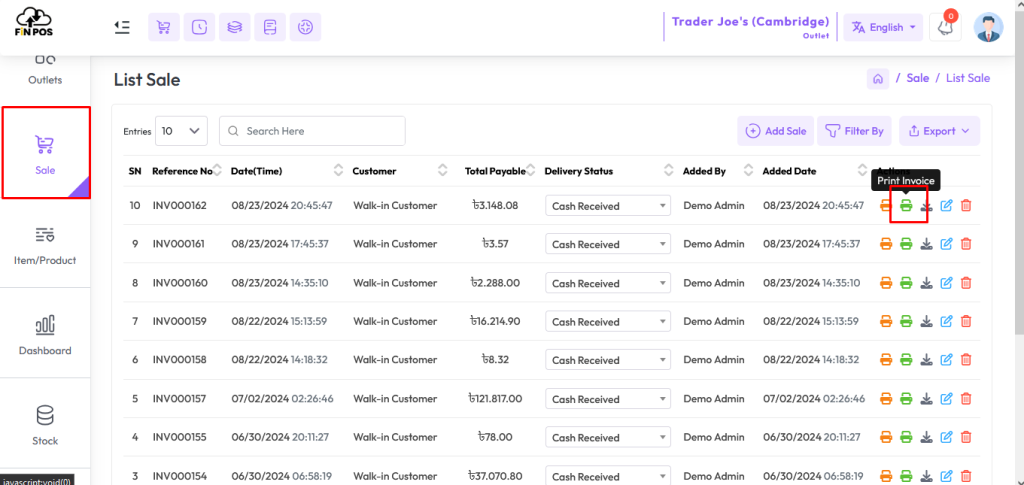
The file will be saved in your browser’s download location.
It helps in maintaining digital copies of invoices for future use.
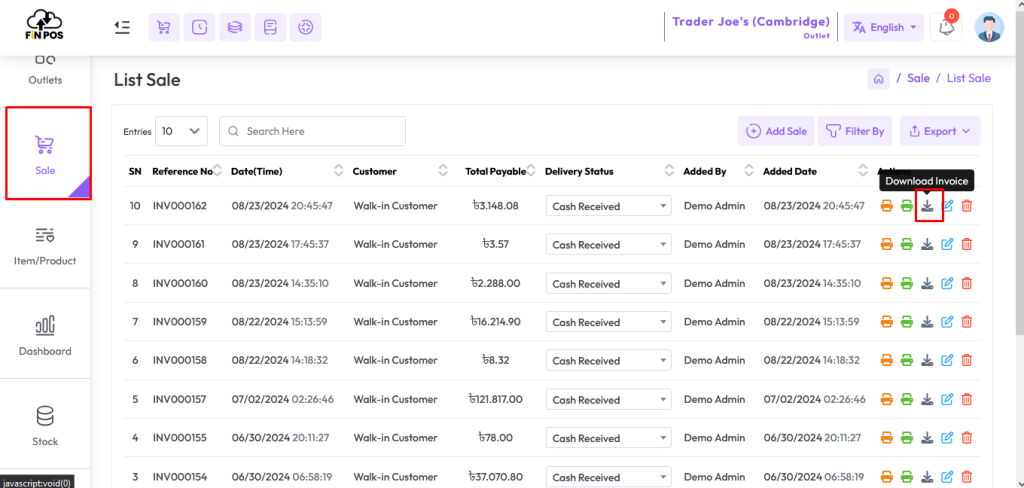
The Download Sale Invoice module lets you easily download invoices in PDF format. It helps in keeping digital records of sales that can be stored, shared, or printed anytime.
In this module you can download the invoice of a sale from the sale list.
Click on the Download Invoice button to get the PDF file.
The file will be saved in your browser’s download location.
In most cases, the default path is C:\Users\Your-Computer\Downloads.
You can also move or rename the file for record-keeping as needed.