
Sale (IMEI Item)
Home / Documentation /
⚙️ Getting Started
🏪 Outlet
⚙️ Settings
🏧 Working With Counter
💰 Working Denomination
🛒 Make a Test Sale
👥 Employee Management
📅 Attendance
📋 Working with Tax
🏦 Account
📦 Working (General Item)
📦 Working (Variation Item)
📱 Working (IMEI Item)
🏷️ Working (Serial Item)
💊 Working (Medicine Item)
💳 Working (Installment Item)
🔧 Working (Service Item)
📊 Stock (General Item)
📊 Stock (Variation Item)
📊 Stock (IMEI Item)
📊 Stock (Serial Item)
📊 Stock (Medicine Item)
📊 Stock (Installment Item)
📥 Purchase (General Item)
📥 Purchase (Variation Item)
📥 Purchase (IMEI Item)
📥 Purchase (Serial Item)
📥 Purchase (Medicine Item)
📥 Purchase (Installment Item)
🏷️ Barcode & Label
🖨️ Working with Printer
🛒 Sale (General Item)
🛒 Sale (Variation Item)
🛒 Sale (IMEI Item)
🛒 Sale (Serial Item)
🛒 Sale (Medicine Item)
🛒 Sale (Installment Item)
🔧 Sale (Service Item)
🌐 Multivendor e-Commerce
📧 Working with Email
💬 Working with SMS
💳 Payment Gateway Setting
💬 Working with WhatsApp
👤 Working with Customer
🏢 Working with Supplier
📤 Purchase Return (General Item)
📤 Purchase Return (Variation Item)
📤 Purchase Return (IMEI Item)
📤 Purchase Return (Serial Item)
📤 Purchase Return (Medicine Item)
📤 Purchase Return (Installment Item)
🔄 Sale Return (General Item)
🔄 Sale Return (Variation Item)
🔄 Sale Return (IMEI Item)
🔄 Sale Return (Serial Item)
🔄 Sale Return (Medicine Item)
🔄 Sale Return (Installment Item)
📊 Dashboard
🎁 Promotion & Coupon
🏆 Loyalty
💳 Installment Sale
🔧 Warranty/Servicing
📈 Income
📉 Expense
💰 Salary/Payroll
📋 Quotation
🔄 Transfer (General Item)
🔄 Transfer (Variation Item)
🔄 Transfer (IMEI Item)
🔄 Transfer (Serial Item)
🔄 Transfer (Medicine Item)
🔄 Transfer (Installment Item)
❌ Damage (General Item)
❌ Damage (Variation Item)
❌ Damage (IMEI Item)
❌ Damage (Serial Item)
❌ Damage (Medicine Item)
❌ Damage (Installment Item)
🏢 Fixed Asset
📊 Report
🔄 Update Software
❌ Uninstall License
The Sale (IMEI Item) module is designed to manage and record sales of IMEI-based products such as mobile phones and tablets. It allows you to track each item by its unique IMEI number, ensuring transparency and accuracy in sales. This feature helps prevent duplication, maintains proper inventory, and makes it easier to verify sold products whenever required.
Add To Cart Modal
The Add To Cart Modal for IMEI products allows you to add mobile or similar devices to the cart with their unique IMEI numbers. It ensures that product details are verified before finalizing the sale, keeping the process accurate and reliable.
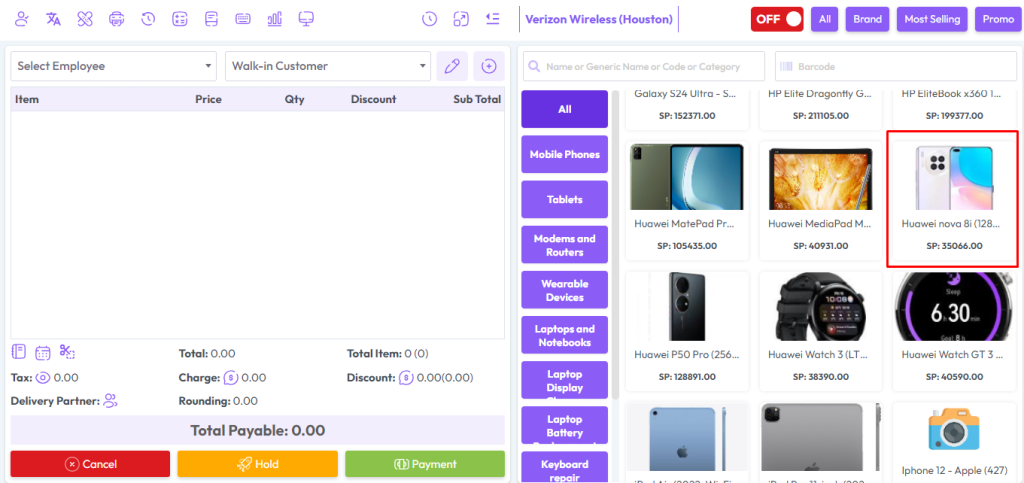
To sell “IMEI Type” products, click on the desired product (for example, “Huawei Nova 8i”).
The product will be added to the cart along with its IMEI details.
You can review, confirm, and proceed with the sale from the modal.
This ensures proper tracking and avoids duplication of IMEI-based products.
After clicking on IMEI product you will get a popup modal.
Here you can see the current stock of IMEI products.
Here the current stock is showing 2 and 1 is added to the quantity field. So the total quantity is 2+1 = 3.
Now you will see 3 IMEIs in the Available IMEI field, select the IMEI you want to sell.
Select Employee from the Employee field if this product sale Employee-wise, Change the price if needed, LPP = Last Purchase Price of this product, WSP=Wholde Sale Price of this product, enter discount if you have permission after that hit “Add To Cart” button to add this product in the cart.

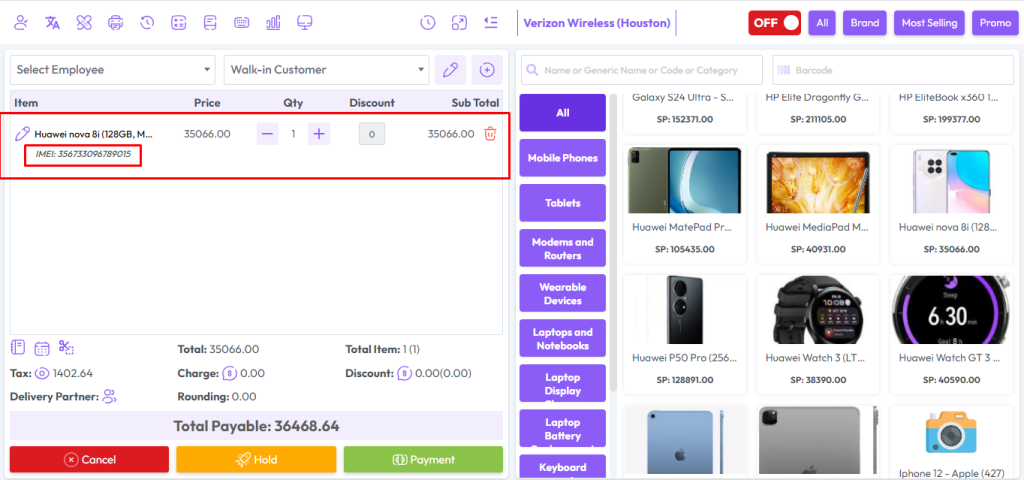
After adding the products to the cart, the cart will look like the snapshot below. It will clearly show the product name, IMEI number, quantity, and price. This helps you verify all details before finalizing the sale and ensures error-free billing.
After the sale you will see an invoice like the snapshot below.
Alternative names are used especially in Arab countries.
Warranties and guarantees can be found on the invoice.

Show Stock Before & After Sale
The snapshot shows the number of stocks available before the sale.
In this case, there are 3 IMEI products listed in the stock.
Each product is tracked with its unique IMEI number for accuracy.
This helps in monitoring availability before completing any sale.

In this example, 1 quantity sale entry has been made with the IMEI number “POCO-M3-0003”. The system records the IMEI with the sale for accurate tracking. This ensures proper inventory control, prevents duplication, and makes it easier to verify sold devices in the future.
The Current Stock Status After Sale displays the updated quantity of IMEI products after completing a sale. The system automatically adjusts the stock by removing the sold IMEI item. This ensures real-time accuracy, prevents stock mismatches, and keeps inventory records up to date.
