Sale (Serial Item)
Home / Documentation /
⚙️ Getting Started
🏪 Outlet
⚙️ Settings
🏧 Working With Counter
💰 Working Denomination
🛒 Make a Test Sale
👥 Employee Management
📅 Attendance
📋 Working with Tax
🏦 Account
📦 Working (General Item)
📦 Working (Variation Item)
📱 Working (IMEI Item)
🏷️ Working (Serial Item)
💊 Working (Medicine Item)
💳 Working (Installment Item)
🔧 Working (Service Item)
📊 Stock (General Item)
📊 Stock (Variation Item)
📊 Stock (IMEI Item)
📊 Stock (Serial Item)
📊 Stock (Medicine Item)
📊 Stock (Installment Item)
📥 Purchase (General Item)
📥 Purchase (Variation Item)
📥 Purchase (IMEI Item)
📥 Purchase (Serial Item)
📥 Purchase (Medicine Item)
📥 Purchase (Installment Item)
🏷️ Barcode & Label
🖨️ Working with Printer
🛒 Sale (General Item)
🛒 Sale (Variation Item)
🛒 Sale (IMEI Item)
🛒 Sale (Serial Item)
🛒 Sale (Medicine Item)
🛒 Sale (Installment Item)
🔧 Sale (Service Item)
🌐 Multivendor e-Commerce
📧 Working with Email
💬 Working with SMS
💳 Payment Gateway Setting
💬 Working with WhatsApp
👤 Working with Customer
🏢 Working with Supplier
📤 Purchase Return (General Item)
📤 Purchase Return (Variation Item)
📤 Purchase Return (IMEI Item)
📤 Purchase Return (Serial Item)
📤 Purchase Return (Medicine Item)
📤 Purchase Return (Installment Item)
🔄 Sale Return (General Item)
🔄 Sale Return (Variation Item)
🔄 Sale Return (IMEI Item)
🔄 Sale Return (Serial Item)
🔄 Sale Return (Medicine Item)
🔄 Sale Return (Installment Item)
📊 Dashboard
🎁 Promotion & Coupon
🏆 Loyalty
💳 Installment Sale
🔧 Warranty/Servicing
📈 Income
📉 Expense
💰 Salary/Payroll
📋 Quotation
🔄 Transfer (General Item)
🔄 Transfer (Variation Item)
🔄 Transfer (IMEI Item)
🔄 Transfer (Serial Item)
🔄 Transfer (Medicine Item)
🔄 Transfer (Installment Item)
❌ Damage (General Item)
❌ Damage (Variation Item)
❌ Damage (IMEI Item)
❌ Damage (Serial Item)
❌ Damage (Medicine Item)
❌ Damage (Installment Item)
🏢 Fixed Asset
📊 Report
🔄 Update Software
❌ Uninstall License
The Sale (Serial Item) module allows you to manage and record sales of serial-based products. It helps in tracking unique serial numbers, maintaining accurate inventory, and ensuring transparency in product sales.
Add To Cart Modal
The Serial Type Sale feature allows you to sell products that are tracked using unique serial numbers. It ensures that each item is recorded individually, providing accurate inventory management and avoiding duplicate sales.
To sell “Serial Type” products, click on the desired product (for example, “Samsung QN90A Neo QLED 4K”).
The product will be added to the cart with its unique serial number details.
This ensures proper tracking of each item and prevents duplication in sales.
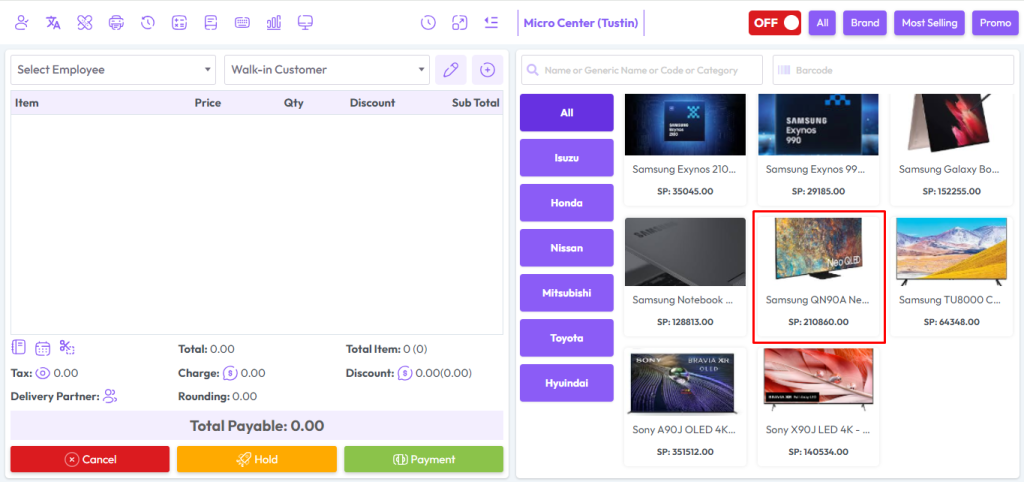
After clicking on Serial product you will get a popup modal.
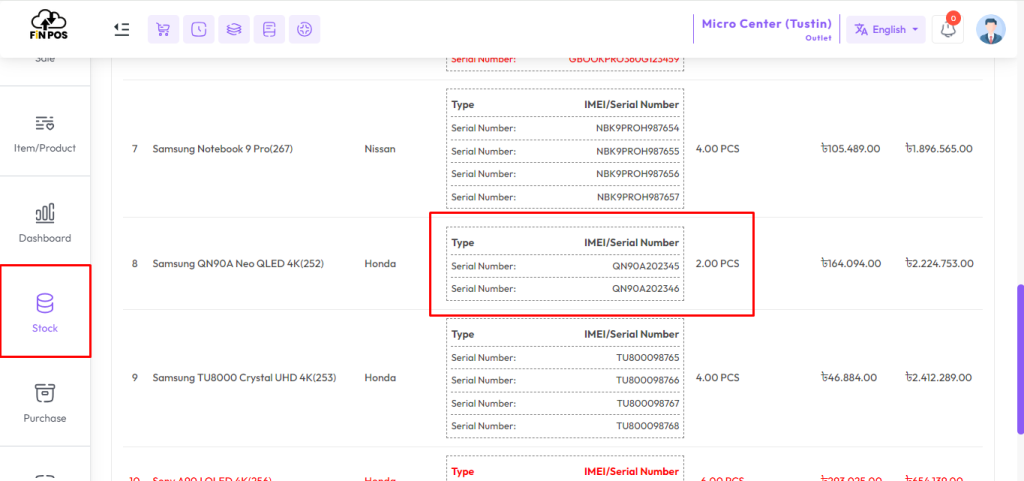
Here you can see the current stock of Serial products.
Here the current stock is showing 2 and 1 is added to the quantity field. So the total quantity is 2+1 = 3.
Now you will see 3 Serials in the Available Serial field, select the Serial you want to sell.
Select Employee from the Employee field if this product sale Employee-wise, Change the price if needed, LPP = Last Purchase Price of this product, WSP=Wholde Sale Price of this product, enter discount if you have permission after that hit “Add To Cart” button to add this product in the cart.

After adding the products to the cart, the cart will look like the snapshot below. It will display product name, serial number, quantity, and price clearly. This helps you double-check the details before completing the sale and ensures accurate record-keeping.

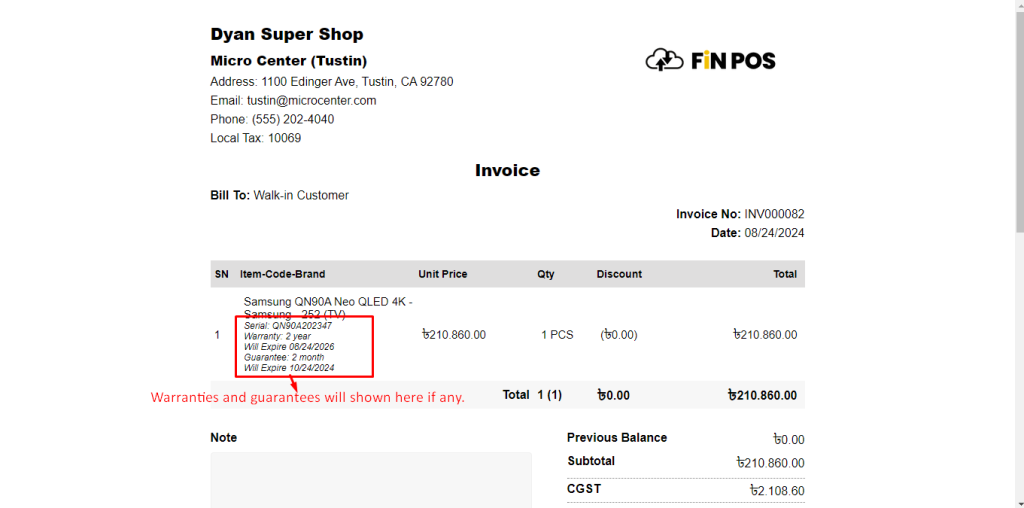
After the sale you will see an invoice like the snapshot below.
Alternative names are used especially in Arab countries.
Warranties and guarantees can be found on the invoice.
Show Stock Before & After Sale
The Show Stock Before & After Sale section displays the available serial products before completing a sale. In this case, 3 serial products are shown in the snapshot. After the sale, the system updates the stock automatically, ensuring accurate tracking of each serial item.
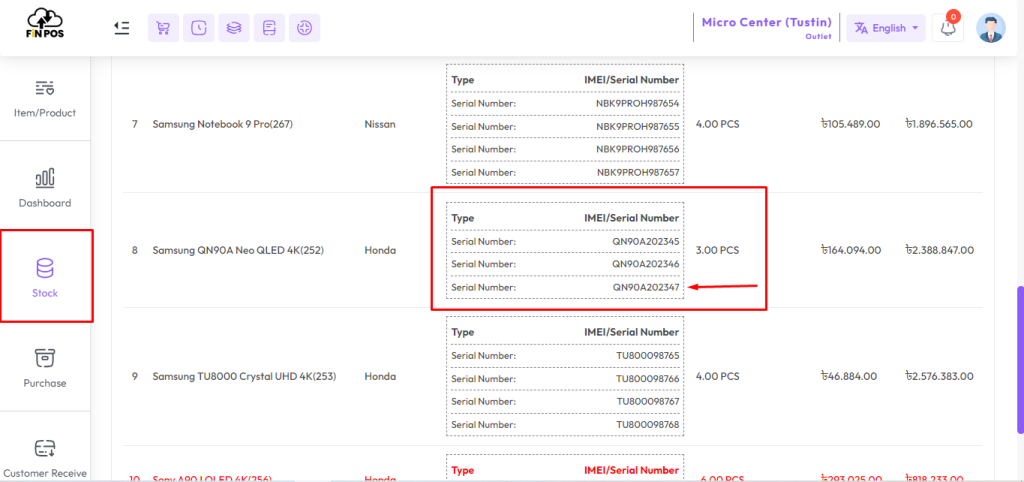
In this example, 1 quantity sale entry has been made with the serial number “QN90A202347”. The system records the exact serial number with the sale, ensuring proper traceability. This helps in maintaining accurate stock control and verifying sold items easily.
The Current Stock Status After Sale shows the remaining quantity and serial products after completing a sale. It updates automatically in the system to reflect accurate stock levels. This ensures better inventory tracking, prevents errors, and maintains transparency in sales records.