
Outlet
Home / Documentation /
⚙️ Getting Started
🏪 Outlet
⚙️ Settings
🏧 Working With Counter
💰 Working Denomination
🛒 Make a Test Sale
👥 Employee Management
📅 Attendance
📋 Working with Tax
🏦 Account
📦 Working (General Item)
📦 Working (Variation Item)
📱 Working (IMEI Item)
🏷️ Working (Serial Item)
💊 Working (Medicine Item)
💳 Working (Installment Item)
🔧 Working (Service Item)
📊 Stock (General Item)
📊 Stock (Variation Item)
📊 Stock (IMEI Item)
📊 Stock (Serial Item)
📊 Stock (Medicine Item)
📊 Stock (Installment Item)
📥 Purchase (General Item)
📥 Purchase (Variation Item)
📥 Purchase (IMEI Item)
📥 Purchase (Serial Item)
📥 Purchase (Medicine Item)
📥 Purchase (Installment Item)
🏷️ Barcode & Label
🖨️ Working with Printer
🛒 Sale (General Item)
🛒 Sale (Variation Item)
🛒 Sale (IMEI Item)
🛒 Sale (Serial Item)
🛒 Sale (Medicine Item)
🛒 Sale (Installment Item)
🔧 Sale (Service Item)
🌐 Multivendor e-Commerce
📧 Working with Email
💬 Working with SMS
💳 Payment Gateway Setting
💬 Working with WhatsApp
👤 Working with Customer
🏢 Working with Supplier
📤 Purchase Return (General Item)
📤 Purchase Return (Variation Item)
📤 Purchase Return (IMEI Item)
📤 Purchase Return (Serial Item)
📤 Purchase Return (Medicine Item)
📤 Purchase Return (Installment Item)
🔄 Sale Return (General Item)
🔄 Sale Return (Variation Item)
🔄 Sale Return (IMEI Item)
🔄 Sale Return (Serial Item)
🔄 Sale Return (Medicine Item)
🔄 Sale Return (Installment Item)
📊 Dashboard
🎁 Promotion & Coupon
🏆 Loyalty
💳 Installment Sale
🔧 Warranty/Servicing
📈 Income
📉 Expense
💰 Salary/Payroll
📋 Quotation
🔄 Transfer (General Item)
🔄 Transfer (Variation Item)
🔄 Transfer (IMEI Item)
🔄 Transfer (Serial Item)
🔄 Transfer (Medicine Item)
🔄 Transfer (Installment Item)
❌ Damage (General Item)
❌ Damage (Variation Item)
❌ Damage (IMEI Item)
❌ Damage (Serial Item)
❌ Damage (Medicine Item)
❌ Damage (Installment Item)
🏢 Fixed Asset
📊 Report
🔄 Update Software
❌ Uninstall License
In point-of-sale (POS) software, an “outlet” usually refers to a specific location or physical store where sales transactions occur. It’s a term used to categorize and manage sales data, stock, and other aspects of retail operations within the software. For businesses with multiple locations, each outlet may have its own set of stock, pricing, and sales records tracked within the POS system.
Add Outlet
In this module, you can create a new outlet by expanding the Outlets menu from the left sidebar and clicking on Add Outlet.
Fill in the required details such as outlet name, address, and contact information.
This helps you manage multiple business outlets efficiently within the system.

Fill up the required fields and hit the submit button to create an outlet. After successfully creating an outlet, you will find it in the “List Outlet”. You can then view, edit, or manage the outlet details anytime as needed. This ensures smooth management of all your outlets in one place.
List Outlet
In this module, you can view all the created outlets by expanding the Outlets menu from the left sidebar and clicking on List Outlet.
The list displays outlet details such as name, address, and contact information.
From here, you can also manage, edit, or delete outlets as required.

You can also edit an Outlet by clicking the Edit button, and delete it by clicking the Delete button. This allows you to keep outlet information accurate and remove outlets that are no longer needed. It ensures better management and organization of your business outlets.
Enter to an Outlet
In this module, you can enter into a specific outlet by clicking on the Enter button from the List Outlet.
Once inside, you can perform transactional work like Purchase, Purchase Return, Sale, Sale Return, Damage, and Transfer.
This feature helps you manage all outlet operations directly and maintain accurate transaction records.
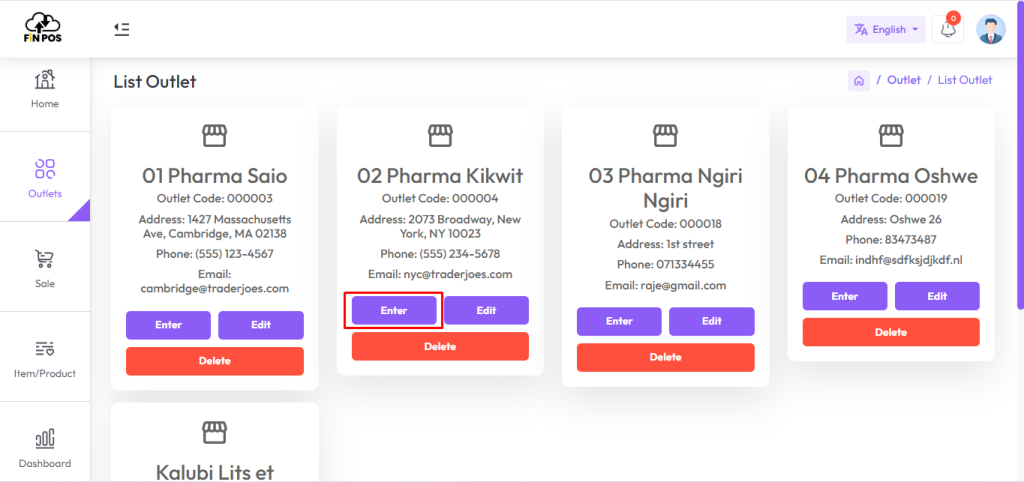
Note: You can’t do any transaction without selecting the “Enter” button from the outlet list, because it’s a prerequisite of any transaction. This ensures that all transactions are linked to the correct outlet for proper tracking and management.